Display Modes
Search
The mode is designed to display the count rate as a search graph. It is suitable for the rapid search of sources or areas with higher radiation levels that usual.
In the Search display mode, the screen displays:
- status bar - at the top;
- count rate search graph - at the bottom.
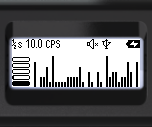
The upper part of the screen, from left to right, displays basic information about the instrument's status:

- Averaging time: the price of one bar on the chart in seconds - 1/2, 1, 2, 4 seconds;
- current count rate value;
- Count rate units: CPS or CPM.
- indication of threshold exceedance for dose rate, dose rate, and count rate level;
- audio indication status;
- Bluetooth or USB connection;
- swing button lock indicator;
- Battery status.
At the bottom of the screen, from left to right:
- Graphical representation of the current count rate.
- search graph of the count rate;
Quick Control is available in this mode:
- A short press on the upper swing button increases the averaging time.
- A brief press on the lower swing button reduces the averaging time;
- A long press on the lower swing button clears the screen and initiates a new search session;
- Pressing and holding the upper swing button toggles the sound indication on and off.
Using the buttons
Quick control in this mode is accessible through buttons:
- A short press on the upper swing button increases the averaging time.
- A brief press on the lower swing button reduces the averaging time;
- A long press on the lower swing button clears the screen and initiates a new search session;
- Long pressing the upper swing button toggles the sound indication on and off.
Updated: Dec 10, 2025