Android App
Can't connect?
There may be situations when the application cannot connect to the device via Bluetooth, or the connection is unstable. In such cases:
- Ensure that the RadiaCode app is permitted to access the location in any mode. This is a requirement of the Android system for Bluetooth Low Energy (BLE) to function in the background. Granting location access does not imply that the application uses location information without the user's consent.
- Turn off Bluetooth on your smartphone, then turn it back on.
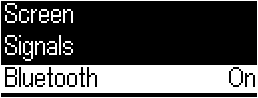
- Turn off Bluetooth on the device through its menu and then turn it back on.
- It has been reported that some smartphone models may experience interference between Bluetooth and Wi-Fi modules. You might try turning off Wi-Fi on your smartphone to resolve this issue. This effect may occur on Xiaomi phones.
- If other Bluetooth devices are connected to your smartphone, disconnect them.
- If possible, test the application's functionality with the device on a different smartphone. According to our statistics, connection issues most frequently occur on Huawei smartphones and similar models.
- Verify the power-saving settings for the RadiaCode app in your smartphone's settings.
- If the app indicates that it requires all permissions, even though they have already been granted, restart your smartphone.
- There are reports that in later versions of the Android system, communication with the device may be temporarily interrupted at intervals of about 10 minutes. If this occurs, you can try the following:
- Enable developer mode in the smartphone settings. You can find instructions by searching (usually, it involves locating the Android showcase menu and tapping the icon for a few seconds).
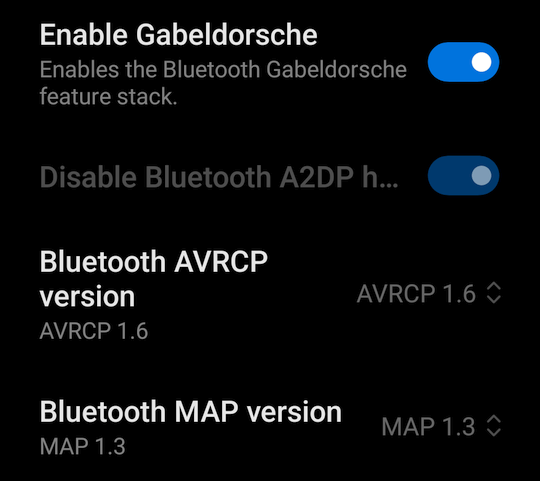
- Go to the "For Developers" settings, find the following settings there and set them as shown in the picture
Updated: Jan 8, 2026