Monitor
This mode is designed to display dose rate or count rate. When the device is turned on, it begins operating in this specific display mode. All incoming data is collected and analyzed. If a change in the radiation situation is detected, the instrument initiates a new data accumulation interval. If there are no indications of changes in the radiation situation, averaging continues to enhance the reliability of the estimation.
The statistical error in Monitor mode is kept at no more than 15% for the confidence interval 2δ at sufficient radiation intensity.
In the Monitor display mode, the screen shows:
- status panel - from the top;
- parameters for estimating dose rate or count rate - at the bottom.
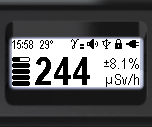
The top section of the screen, from left to right, displays essential information about the instrument's status:

- current time: hours, minutes;
- detector temperature;
- indication of exceeding the thresholds for dose rate, dose, and count rate;
- audio indication status;
- presence of a Bluetooth or USB connection;
- swing button lock indicator;
- battery status.
At the bottom of the screen, from left to right:
- graphical representation of the dose rate or count rate estimate;
- value of the dose rate or count rate estimate;
- value of random error in %;
- dose rate measurement units: Sv/h, R/h, or count rate: CPS, CPM.
Using the menu, you can choose between the measurement units:
- Sv/h or R/h - for displaying dose rate;
- CPS or CPM - when displaying the count rate.
Quick Control is available in this mode:
- Briefly press the top swing button to toggle between the types of photon radiation intensity displays:
- Press and hold the upper swing button to toggle the sound indication on and off;
- Briefly press the lower swing button to activate the sound indication for registered clicks.
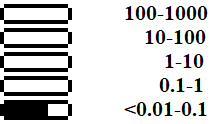
Each horizontal bar displays a graphical representation of a value (dose rate, dose, count rate) on a logarithmic scale.
The ranges of the bars differ by a factor of 10. For example, for dose rate (µSv/h), the ranges will appear as follows:
Using the buttons
In this mode, quick control is accessible through the buttons:
- A short press on the top button of the swing switches between the types of photon radiation intensity display: dose rate or count rate;
- Long pressing the top button of the swing toggles the sound indication on and off;
- A short press on the lower button of the swing activates the sound indication for registered quanta (clicks).
Configuring alarm thresholds
Two alarm thresholds for the dose rate level can be configured using the menu.
When the dose rate alarm threshold is exceeded, a pulsating icon will appear in the status bar:
- "Alarm 1" –
 ;
; - "Alarm 2" –
 ;
; - "Alarm 3 (off the scale)" –
 .
.
Two alarm thresholds for the count rate alarm level can be configured using the menu. When the count rate alarm threshold is exceeded, a pulsating icon will appear in the status bar:
- "Alarm 1" –
 ;
; - "Alarm 2" –
 ;
; - "Alarm 3 (exceeds limit)" –
 .
.
Aktualisiert: 10. Dez. 2025