Alarms
Alarms you may encounter while measuring radiation.
The main sources of alarms in the Radiacode device are:
- current count rate value;
- current dose rate value;
- accumulated dose value.
Each source in your device has three alarm thresholds.
If the current count rate, dose rate, or dose value exceeds any of the thresholds from bottom to top, an Alarm event occurs:
- first threshold - Alarm 1;
- second threshold - Alarm 2;
- upper limit of the scale - exceeds scale;
The alarm threshold values for the first and second levels, specific to each source, are configured in the device settings. You can adjust them at your discretion.
The third threshold value represents the upper limit of the scale for each measured value. These thresholds cannot be modified through the menu.
The device continuously monitors the current values of count rate, dose rate, and accumulated dose, comparing them with the threshold values.
Exceeding any of the thresholds places the instrument in the Alarm state.
Each Alarm Source specifies one of four states:
- Normal - the value is below the first threshold (no alarm);
- Alarm 1 - value exceeds the first threshold but does not exceed the second;
- Alarm 2 - the value exceeds the second threshold but does not exceed the third;
- Over scale - value exceeds the third threshold, surpassing the scale.
Exceeding the upper threshold by count rate results in unreliable dose rate estimation. In this situation, the upper threshold for dose rate is also considered exceeded.
If any of the alarm thresholds for dose rate, count rate, or accumulated dose are exceeded, the corresponding alarm will be activated. To stop the alarm at any level, you need to confirm by briefly pressing the round button to acknowledge the alarm. The instrument will continue to display the exceeded level with a flashing icon of the appropriate type. To terminate an alarm based on the accumulated dose level, you must reset it to zero or change the corresponding alarm threshold.
Each Alarm Event has corresponding alarms associated with it:
- vibration signal
- audible alarm
Audio and vibration alarms can be enabled or disabled in the Radiacode-10X series settings for each level of any alarm source independently.
During an alarm event, the Radiacode-10X series will activate the alarms permitted in the settings.
You can stop the alarm by briefly pressing the round button.
The next alarm event will be signaled again.
The Alarm Status is shown by:
- The red LED flashes;
- alarm icons appear on the device's status panel display;
- unacknowledged alarm status line.
| Icon | Description |
|---|---|
| Alarm 1 for Count Rate. |
| Alarm 2 on Count Rate. |
| Alarm 3 triggered when count rate exceeds scale. |
| Alarm 1 on Dose Rate. |
| Alarm 2 on Dose Rate. |
| Alarm 3 triggered due to dose rate exceeding the scale. |
| Alarm 1 on Dose. |
| Dose Alarm 2. |
| Alarm 3 for dose exceeding scale. |


Light signals can be turned on or off in the settings of the Radiacode-10X series.
If the device is locked and the alarm indication settings (sound and/or vibration) are enabled, a line displaying the maximum recorded levels of unconfirmed alarms will appear on the device display once the thresholds are exceeded:
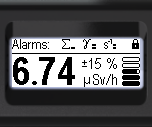
The following rules are established for indicating the states and events of alarms on the display:
- If the swing buttons are locked, the status panel displays the message "Alarms:" along with icons representing the maximum alarm levels reached from the time the buttons were locked to the present moment—one icon for each source.
- By pressing and holding the round button, the user can confirm viewing the displayed list of maximum alarm levels. After this, the swing buttons will be unlocked, and the normal instrument status panel will be shown.
- If alarm events occur while the menu is displayed, upon exiting the menu, the display will show the previously mentioned list of maximum alarm levels. The swing buttons will then be locked.
- If the swing buttons are unlocked and the display is in one of the measurement modes, the status bar will show the current alarm level icons for each source, alternating between them.
Updated: Dec 10, 2025