Calibrating the Energy Scale of the Device
Calibrating the energy scale of the spectrum is essential to accurately determine the energy of the gamma lines by their channel numbers. Devices undergo a calibration process at the factory, but detector parameters may change over time, necessitating a calibration update. This requires sources with known isotopic composition and energies in advance. The calibration points are the vertices of the peaks on the gamma spectrum. The result of the calibration is the calibration factor values, which the device uses to convert the spectrum channel number into the radiation energy value in keV using a second-degree polynomial:
E = a₀ + a₁·x + a₂·x²
where
x is the channel number.
a₀, a₁, a₂ are calibration coefficients.
Spectrum Energy Scale Calibration Procedure
Calibration is conducted at three points to ensure sufficient linearity across the entire range of energies under study. To perform the calibration, the user will need a spectrum containing monoenergetic lines, preferably located at the beginning, middle, and end of the energy scale. For example, the following isotopes produce such lines:
- K-40 (1461 keV);
- Am-241 (59 keV);
- Lu-176 (202, 307 keV);
- Cs-137 (32, 662 keV);
- Th-232 (238, 583, 2614 keV);
- Ra-226 (78, 351, 609 keV);
Caution! You are solely responsible for any potential legal consequences and health risks associated with acquiring, storing, and handling radioactive materials. Please ensure that you comply with local laws and regulations and observe all safety precautions when working with radioactive materials.
Th-232, a naturally occurring element, is the most convenient and simple option for calibration. In most countries worldwide, small quantities of Th-232 are legal and available for purchase in local stores, for example, in the form of welding electrodes WT-20.
You can also use alternative sources or their combinations for calibration, such as Cs-137 and K-40. It is not necessary to collect the spectrum with both sources simultaneously; you can collect two separate spectra and memorize the channels where the lines appear during calibration. For instance, after collecting the spectrum of Cs-137, note that on channel 3 there was a peak with an energy of 32 keV, and on channel 66 there was a peak with an energy of 662 keV. After collecting the K-40 spectrum, by selecting these channels, enter the appropriate energy values (32, 662, 1461 keV).
For three-point calibration with a single source, it is best to use Th-232 based sources. However, a specific peculiarity must be considered: the first line is better chosen at the low-energy level, specifically the X-ray fluorescence line. If the source is a thoriated electrode, the X-ray fluorescence energy will be about 65 keV. If the source does not contain heavy elements, the line will have an energy of about 88 keV.
After calibrating the device, it is advisable to test it on sources with a different isotopic composition. Additionally, due to the nonlinearity introduced by the discrete nature of the channel step, the lines may not always align precisely with the intended channel. This is particularly true at the beginning of the spectrum.
If a rough calibration without a source is needed, the K-40 isotope is recommended. You should dial the background spectrum, where the peak at 1461 keV or potassium fertilizer will be clearly visible, and the peak should be entirely colored in yellow. Then, by entering the settings, adjust the calibration factor A1 in increments of 0.1 until the top of the peak reaches 1461 keV.
Calibration procedure
- Position the device and the reference source to be measured as close to each other as possible. The detector should be placed with a "+" sign on the source, or if the source is powerful, it should be pointed in its direction with a "+" sign. It is preferable that the count rate does not exceed 500 cps during calibration.
- In the "Spectrum" tab, reset the spectrum by clicking on
 and selecting "Restart Accumulation" from the drop-down menu.
 - After selecting the reference points, wait until all spectral lines (Gaussians) used for calibration turn yellow. This indicates that the spectrum data has achieved sufficient statistical reliability.
- Tap on and select "Energy Scale Calibration" from the drop-down menu. At the top of the tab, you will be prompted to enter the energy value.

- Touch the graph and move the marker lines to select the first point on the graph. Enter the energy corresponding to the point next to the "Next" button. Then, tap the "Next" button.
- Repeat this process twice and then press the "Done" button.
- The application will verify the validity of the channel number values. If the values are invalid, a diagnostic message will be displayed. If the values are valid, a window will appear showing a table with energy values and their corresponding spectrum channel numbers, along with the calculated calibration factors below the table:
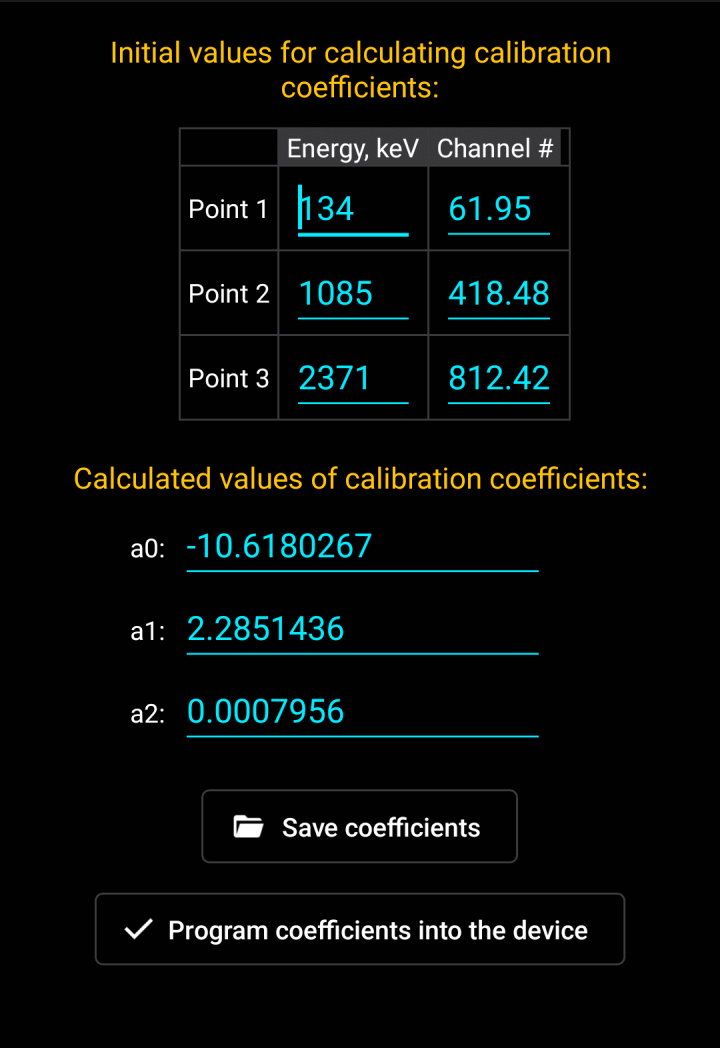
Invalid calibration factor values are displayed in red. The application prevents writing these values to the device.
You can manually correct the table data, and changes to energies and/or channel numbers will automatically recalculate the factor values.
- Press the "Program factors to device" button to finish the calibration. If the calibration was started from the View tab, the button will save the spectrum currently open for viewing to the library with new coefficients.
If you need to restore the device's factory calibration or manually adjust the calibration factors, you can use the "Calibration factors" button in the “Device settings” dialog box.
Updated: Jan 9, 2026