Display
The device features a monochrome graphical display.
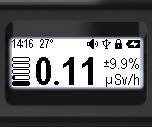
- Monochrome graphic LCD;
- 128x48 dots;
- 34x13 mm;
- FSTN, transflective, positive;
- Built-in backlight.
*Handle with care; the display may break or scratch if not handled carefully.
The screen has a backlight for use in the dark. The device automatically detects the light level when set to "Auto." In this mode, the backlight turns on only when the button is pressed. In bright light, such as sunlight, the backlight will not activate.
The backlight brightness has ten levels.
You can adjust the screen image orientation for left- or right-handed use, or choose the automatic rotation mode.
Power-on conditions, backlight time, backlight brightness, and image orientation are configured through the menu in the Settings section.
The display is used to show:
- device status;
- graphical dose rate level;
- control menu;
- settings menu;
- spectrum mode, for estimating absorbed radiation energies;
- monitor mode, for estimating the dose rate;
- Dose mode, for estimating the accumulated dose;
- Search mode, for visual estimation of the count rate.
The status panel is located at the top of the display. The content of the status panel varies depending on the selected display mode.
The type and meaning of the icons used are described in more detail in the section Icons.
Updated: Jan 9, 2026