Display Icons
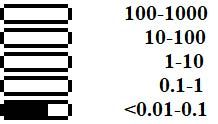
In all display modes except settings, the display presents a logarithmic indicator:

Each horizontal bar represents a value (dose rate, dose, count rate) on a logarithmic scale.
The ranges of the bars differ by a factor of 10. For example, for dose rate (μSv/h), the ranges will appear as follows:
Various icons are used to label fields on the device status panel.
| Icon | Description |
|---|---|
| At least 60% charged |
| At least 30% charged |
| At least 10% charge |
| The battery charge is less than 10%, it needs to be recharged. |
| The battery is charging |
| Charging complete, external power supply |
| The "swing" buttons are locked. |
| USB communication has been successfully established |
| Bluetooth communication has been successfully established |
| All sounds are turned off. |
| Sounds included |
| Level 1 Alarm on Count Rate |
| Level 2 Alarm on Count Rate |
| Count Rate Over-Range Alarm |
| Level 1 Dose Rate Alarm |
| Level 2 Dose Rate Alarm |
| Dose rate over-range alarm |
| Dose Level 1 Alarm |
| Level 2 Alarm on Dose |
| Dose exceeds scale alarm |
| Linear scale of the amplitude of the energy spectrum of photon radiation |
| Logarithmic scale of the amplitude of the energy spectrum of photon radiation |


In the menu (accessed by a short press on the round button), the sections are represented by icons and text.
| Icon | Name | Description |
|---|---|---|
| Device settings menu | |
| Display of the radiation energy spectrum | |
| Show the current dose rate or count rate | |
| Display of accumulated dose of photon radiation (gamma and X-ray) | |
| Search mode - displays the count rate as a graph | |
| Powering down the device | |
| About the device | Details regarding the dosimeter's serial number and software version |




Updated: Dec 10, 2025