Activity
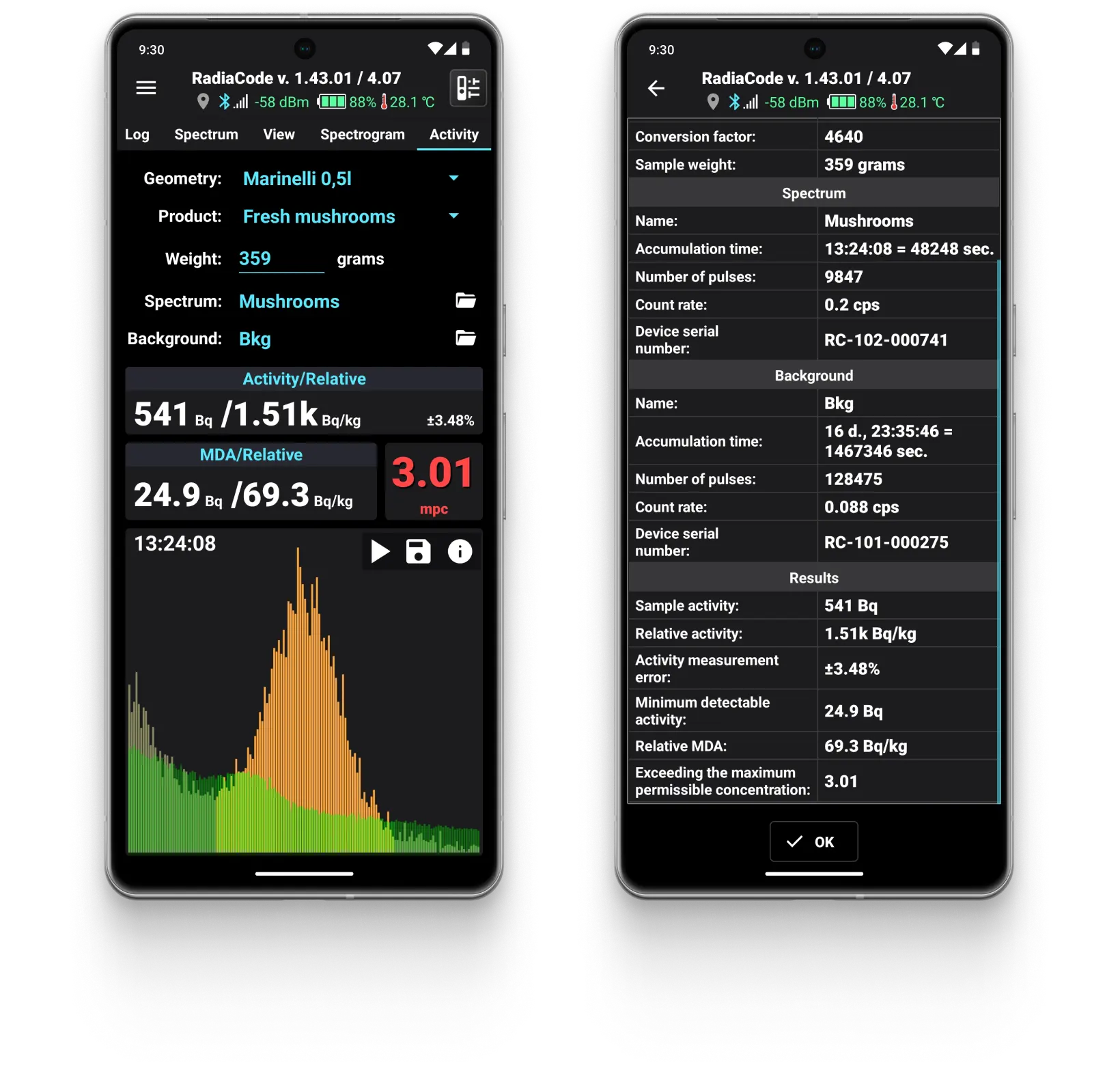
The “Activity” tab is designed to measure the absolute and specific activity of the Cs-137 isotope in various loose and liquid materials (primarily in food) and the absolute activity of Cs-137 point sources. This isotope is one of the main pollutants following nuclear accidents and tests.
Measurement parameters
The upper section of the tab shows the parameters that need to be specified before beginning the measurement:
| Parameter name | Description |
|---|---|
Geometry | The parameter is chosen from the list and defines the geometry of the sample used to evaluate the activity of Cs-137. If the sample dimensions are small (less than 5 mm), the geometry should be set to "Point source 5 cm." In this case, during measurement, the sample is positioned 5 cm away from the "+" symbol on the back cover of the device and from the side of this symbol. If the sample is large enough and does not fit the description of the point source mentioned above, then one of the containers from the list should be selected. Note that containers are not included in the device delivery set and must be purchased separately. |
Product | Name of the sample material, selected from the list. This parameter is not entered if the geometry "Point source 5 cm" is selected. |
Weight | The numerical value of the sample weight in grams, accurate to 0.1 g. This parameter is omitted if the "Point source 5cm" geometry is selected. |
Spectrum | Displays the spectrum name of the sample taken from the spectrum library, or "Current" if a new spectrum is being accumulated during the measurement process. |
Background | Name of the background spectrum from the spectra library |
Measurement results
The results are shown below the measurement parameters and are categorized into: Activity/Specific, MDA/Specific, and MPC.
| Result name | Description |
|---|---|
Activity | Absolute activity of the sample minus the background, in becquerels. |
Specific activity | Specific activity of the sample, based on the injected mass, in becquerels per kilogram. The parameter is not calculated if geometry is selected “Point source 5 cm” |
% | Estimation of the random error in the current values of absolute and specific activity. The error decreases as the measurement time increases. When error values exceed 30%, the measured activity values are considered unreliable and are displayed in gray. If it is impossible to estimate the error, dashes are displayed. |
MDA | Estimation of the random error in the current values of absolute and specific activity. The error decreases as the measurement time increases. When error values exceed 30%, the measured activity values are considered unreliable and are displayed in gray. If it is impossible to estimate the error, dashes are shown. |
Specific MDA | Estimate of the minimum detectable specific activity calculated based on the MDA and the sample mass, in becquerels per kilogram. The parameter is not calculated if geometry is selected “Point source 5 cm”. |
MPC | Exceeding the MPC level, in times. MPC is maximum permissible concentration, tabular values are taken for Russia. The parameter is not calculated if geometry is selected “Point source 5 cm”. |
Spectrum
At the bottom of the “Activity” tab, there is an area for displaying the histogram of the spectrum section, which is used to calculate the above estimates. In the center of the histogram, there is a region of the spectrum where the presence of a Cs-137 peak with an energy of 662 keV is assumed. The region with energies of 662 ±100 keV is highlighted in brighter colors. The criterion for detecting cesium in the sample is a bell-shaped peak on the spectrum, which stands out above the background level, with a maximum in the middle of the graph. If such a peak is not visible, the measured values may be unreliable.
Start/stop button (combined) is used to start or stop the measurement. When beginning a measurement, you can either continue the current measurement (if any) or start a new one. During the measurement, the current data is saved every minute. The measurement will automatically resume after reconnecting the device and restarting the application.
“Save” buttonis used to save the obtained spectrum to the spectra library.
The “Info (i)” button is used to display detailed information about the measurement.
"Gear" buttonopens the activity measurement settings dialog:
Activity measurement units:Becquerel - defined as the activity of a source where, on average, one radioactive decay occurs per second. 1 [Bc] = 1 decay/sec.
Curie is an outdated unit of activity. It is defined as the activity of 1 gram of radium-226 along with its daughter radionuclides. 1 [Ci] = 37,000,000,000 Bq.
Use MPC standards for the country:Select the country to which the MPC standards apply. When you choose a country, the list of products available for measuring their activity will also change.
Error level: You can enable push notifications when the required statistical measurement error is reached.
Issue a push notification when the measurement error level drops to: you can choose the measurement error level at which a notification will be sent. The statistical measurement error range is from 1% to 20%.
Offer to save the spectrum when stopping the activity measurement: If the activity measurement is conducted in multiple steps, this option can be disabled to prevent the application from offering to save the accumulated spectrum each time the measurement is stopped.
Measurement procedure
Use the following methods to evaluate the sample activity:
Updated: Jan 9, 2026