Device Menu
First, let's consider the state "The device is off" as the initial state.
- Press and hold the round button until the device turns on (for at least 3 seconds).
- Once turned on, the device will be in Monitor mode and display the dose rate;
- With the correct settings, the sound power on will play at this time;
- With the appropriate settings, the display backlight will turn on at this moment.
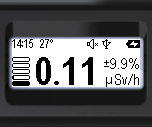
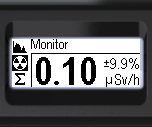
- Briefly press the round button to navigate to the menu;
- The current menu item's name will be displayed at the top. (In this case, it is "Monitor");
- The icons for the main menu items will be arranged vertically.
- The active item will be highlighted with an inverted icon.
There are seven menu items available on the main menu level.
| Icon | Name | Description |
|---|---|---|
| Accessing the device settings submenu | |
| Displaying the energy spectrum of photon radiation | |
| Displaying the current dose/count rate | |
| Displaying the accumulated dose of photon radiation (gamma and X-ray) | |
| Displaying the count rate as a graph | |
| Powering down the device | |
| Information about the serial number and software version. |





Short press the up/down swing buttons to select the desired item. The selected item will be highlighted with a negative icon. To confirm your selection, press the round button briefly. Only three selections are visible on the instrument screen at a time; others will appear when the up/down swing buttons are pressed again.
Out of the seven items, four  Spectrum,
  Monitor,
  Dose,
Dose,  Search provide access to selecting the radiation situation display mode.
Item  Power off is an action point. If confirmed with the round button, the instrument will be switched off.
Item  Settings is used to access the submenu of the instrument settings.
Item  About device is used to access information about the instrument number, as well as the firmware and bootloader versions.
At all levels, the menu is organized in a cyclical manner. For example, on the main level, pressing the down button shifts the focus from item to item in the following order: Monitor > Dose > Search > Power Off > About device > Settings > Spectrum ...
Updated: Dec 10, 2025