Icons and symbols
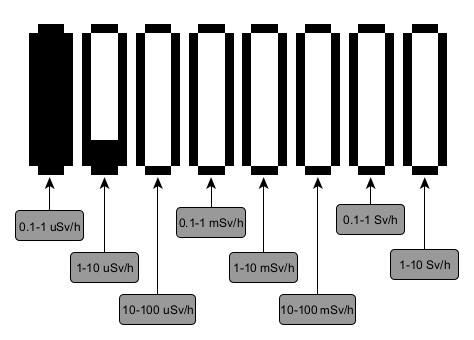
Logarithmic indicator
In all display modes except settings, a logarithmic indicator is shown. Each vertical bar represents a value (dose rate, dose, count rate) on a logarithmic scale. Adjacent bars differ by a factor of 10:
Status bar icons
| Icon | Description |
|---|---|
| 100–90% charge, running on battery |
| Less than 90% charge |
| Less than 80% charge |
| Less than 70% charge |
| Less than 60% charge |
| Less than 50% charge |
| Less than 40% charge |
| Less than 30% charge |
| Less than 20% charge |
| Less than 10% charge — charge the battery |
| Charging in progress |
| Fully charged, powered externally |
| Swing buttons locked |
| USB connection established |
| Bluetooth connection established |
| All sounds off |
| Sounds on |
| Count Rate Alarm 1 |
| Count Rate Alarm 2 |
| Count Rate over-range |
| Dose Rate Alarm 1 |
| Dose Rate Alarm 2 |
| Dose Rate over-range |
| Dose Alarm 1 |
| Dose Alarm 2 |
| Dose over-range |
| Low temperature threshold crossed — Overcooling |
| High temperature threshold crossed — Overheating |
| Range 1 (pulse mode) icon |
| Range 2 (current mode) icon |


Note: on Radiacode Zero, the battery charge percentage is displayed next to the graphical battery icon.
Menu item icons
| Icon | Item | Description |
|---|---|---|
| Settings | Device settings menu |
| Monitor | Current dose rate or count rate display |
| Dose | Accumulated photon radiation dose (gamma and X-ray) |
| Search | Search mode — count rate displayed as a graph |
| Power off | Turning off |
| Device info | Serial number and firmware version |


Updated: Oct 21, 2026