Monitor
On startup, the device operates in this mode. All incoming data is accumulated and analysed. When a change in the radiation environment is detected, the device starts a new accumulation interval. When no changes are detected, it continues averaging to increase the confidence of the estimate.
Displayed values are considered valid if:
- their random error does not exceed 30% for the dose rate and 50% for the count rate
- the device sensor temperature is below +45 °C
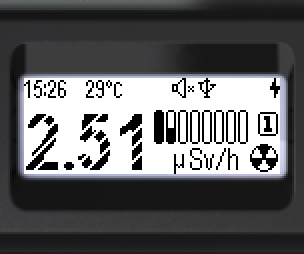
- Low-confidence values are shown with digits hatched with light diagonal stripes.
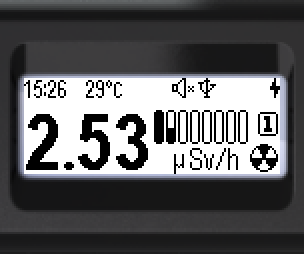
- Valid values are shown with fully filled digits.
Two operating ranges:
Pulse mode (1): from 0.1 µSv/h to 1 mSv/h. Data comes from the scintillator by registering individual flashes, which allows estimating low radiation levels and searching for sources. Energy response compensation uses a predefined calibration function programmed at the factory. Clicks and count rate are available — the device clicks on each registered photon and shows cps values.
Current mode (2): 1 mSv/h to 9 Sv/h. A different mechanism is used for real-time dose rate estimation based on an integral value. Clicks and detector count rate remain available, but the click tone is different in this mode. This mode is required for operation in high radiation fields.
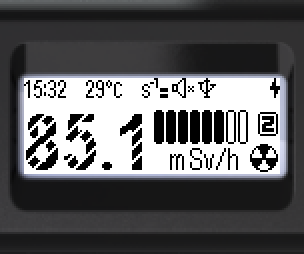
Monitor mode screen:
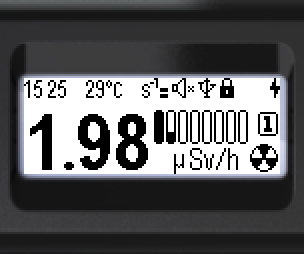
Status bar (top, left to right):

- Current time: hours, minutes
- Radiation sensor temperature
- Threshold exceedance sign for dose rate, dose, count rate or temperature
- Sound indication status
- Bluetooth or USB connection status
- Lock icon
- Battery status
Bottom of the screen: dose rate or count rate estimate, logarithmic indicator, range number ( /
 ), units (Sv/h, rem/h or cps, cpm), current mode icon (
 Monitor).
Units can be selected via the menu: Sv/h or rem/h for dose rate display; cps or cpm for count rate display.
The radiation intensity type (dose rate or count rate) can be selected via the menu or switched quickly using the device buttons.
Hotkeys:
- Short ▲ — toggle dose rate ↔ count rate (pulse mode only)
- Long ▲ — sound indication on/off
- Short ▼ — turn clicks on/off (pulse mode only and only when sound is on)
When alarm thresholds are exceeded — pulsing icons appear:
Dose rate:
“Alarm 1” —  ; “Alarm 2” —
 ; “Out of scale” —

Count rate:
“Alarm 1” —  ; “Alarm 2” —
 ; “Out of scale” —

Updated: Oct 21, 2026