Funktionsweise der Alarme
Die Alarmquellen sind in zwei Gruppen unterteilt:
- Hauptquellen – aktuelle Zählrate, aktuelle Dosisleistung, akkumulierte Dosis
- Zusatzquellen – aktuelle Temperatur des Strahlungssensors
Das Gerät vergleicht die aktuellen Messwerte ständig mit den zugehörigen Schwellen. Je nach Richtung der Schwellenüberschreitung entsteht ein Alarmereignis oder ein Aufhebungsereignis. Jedes Alarmereignis versetzt das Gerät aus dem Normalzustand in den Alarmzustand. Sind durch Aufhebungsereignisse alle Alarme aufgehoben, kehrt das Gerät in den Normalzustand zurück.
Hauptalarme
Alle Hauptalarmquellen haben je drei Alarmschwellen.
Überschreitet Zählrate, Dosisleistung oder Dosis eine Schwelle, tritt ein Alarmereignis ein: erste Schwelle – Alarm 1; zweite Schwelle – Alarm 2; oberer Skalenendwert – Messbereichsüberschreitung.
Die Schwellen der ersten und zweiten Stufe werden in den Einstellungen für jede Quelle separat festgelegt und lassen sich beliebig ändern. Die dritte Schwelle ist der obere Skalenendwert der Messgröße; sie lässt sich im Menü nicht ändern.
Jede Hauptalarmquelle hat einen von vier Zuständen:
- Normal – Wert unter der ersten Schwelle (kein Alarm)
- Alarm 1 – Wert über der ersten, aber nicht über der zweiten Schwelle
- Alarm 2 – Wert über der zweiten, aber nicht über der dritten Schwelle
- Out of scale (Messbereichsüberschreitung) – Wert über der dritten Schwelle, außerhalb der Skala
Zusatzalarme
Die Temperatur des Strahlungssensors ist eine zusätzliche Alarmquelle mit zwei Schwellen – einer oberen und einer unteren.
Überschreitet die aktuelle Temperatur die obere Schwelle oder unterschreitet sie die untere Schwelle, entsteht ein Temperatur-Alarmereignis.
Die Temperaturschwellen entsprechen den Grenzen der Betriebstemperatur aus den technischen Daten des Geräts. Diese Werte sind fest vorgegeben und lassen sich im Menü nicht ändern.
Die Temperatur hat einen von drei Zuständen:
- Normal – Wert über der unteren und unter der oberen Schwelle (kein Alarm)
- Niedrige Temperatur – Wert unter der unteren Schwelle
- Hohe Temperatur – Wert über der oberen Schwelle
Alarmsignale
Jedem Alarmereignis sind Alarmsignale zugeordnet: Ton und Vibration. Sie lassen sich in den Einstellungen unabhängig ein- und ausschalten – für jede Stufe jeder Quelle. Signal beenden – runde Taste kurz drücken; beim nächsten Alarmereignis ertönt es erneut.
Der Alarmzustand wird angezeigt durch:
- Blinken der roten LED (nur Bereich 1)
- Alarmsymbole in der Statusleiste
- Zeile der nicht quittierten Alarme
- Dialogfenster mit Alarmsymbolen
| Symbol | Beschreibung |
|---|---|
| Zählrate Alarm 1 |
| Zählrate Alarm 2 |
| Zählrate Messbereichsüberschreitung |
| Dosisleistung Alarm 1 |
| Dosisleistung Alarm 2 |
| Dosisleistung Messbereichsüberschreitung |
| Dosis Alarm 1 |
| Dosis Alarm 2 |
| Dosis Messbereichsüberschreitung |
| Alarm „Niedrige Temperatur“ |
| Alarm „Hohe Temperatur“ |


Lichtsignale lassen sich in den Einstellungen ein-/ausschalten (nur Bereich 1).
Verhalten des Geräts bei einem Alarmereignis
Bei Alarmereignissen, deren Ton- und Vibrationssignale in den Geräteeinstellungen deaktiviert sind, wird der aktuelle Alarmzustand durch die entsprechenden Symbole in der Statusleiste angezeigt.
Bei Alarmereignissen, deren Ton- und/oder Vibrationssignale aktiviert sind, wird die Signalisierung ausgelöst: Das Gerät vibriert und gibt den Alarmton aus. Ein kurzer Druck auf die runde Taste schaltet die Signalisierung ab. Nach einem Alarmsignal erwartet das Gerät eine ausdrückliche Quittierung durch den Benutzer (das Abschalten der Signalisierung durch kurzen Druck ist keine Quittierung). Ein Alarm wird nur durch langen Druck auf die runde Taste quittiert. Dabei zeigt das Display die Zeile der maximalen registrierten Alarmstufen – entweder in der Statusleiste:
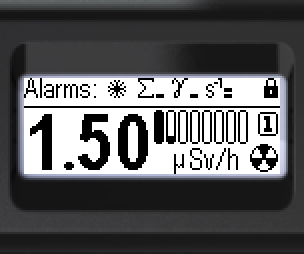
oder als Dialogfenster:
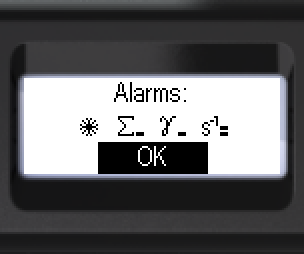
Nach der Quittierung der Alarme stellt das Display den vorherigen Bildschirminhalt wieder her. Die aktuell aktiven Alarmzustände aller Quellen werden in der normalen Statusleiste durch die entsprechenden Symbole abwechselnd angezeigt.
Sinkt die Stufe eines quittierten Alarms, ändert sich nur sein Symbol in der Statusleiste.
Kehrt ein quittierter Alarm in den Zustand Normal zurück, verschwindet sein Symbol aus der Statusleiste. Ein Alarm der akkumulierten Dosis endet jedoch nur durch Zurücksetzen der Dosis oder durch Ändern ihrer Schwelle.
Aktualisiert: 21. Okt. 2026