Symbole und Zeichen
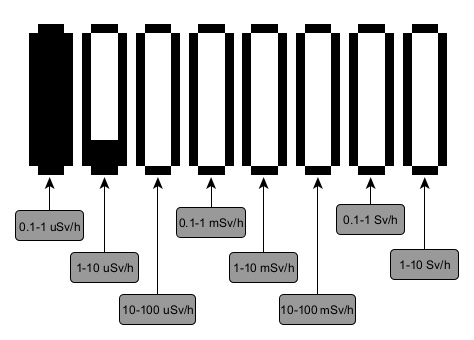
Logarithmische Balkenanzeige
In allen Anzeigemodi außer den Einstellungen wird eine logarithmische Balkenanzeige gezeigt. Jeder senkrechte Balken stellt einen Wert (Dosisleistung, Dosis, Zählrate) logarithmisch dar. Die Skalen benachbarter Balken unterscheiden sich um den Faktor 10:
Symbole der Statusleiste
| Symbol | Beschreibung |
|---|---|
| 100–90 % Ladung, Akkubetrieb |
| Weniger als 90 % Ladung |
| Weniger als 80 % Ladung |
| Weniger als 70 % Ladung |
| Weniger als 60 % Ladung |
| Weniger als 50 % Ladung |
| Weniger als 40 % Ladung |
| Weniger als 30 % Ladung |
| Weniger als 20 % Ladung |
| Weniger als 10 % Ladung – Akku laden |
| Akku wird geladen |
| Vollständig geladen, externe Stromversorgung |
| Wipptasten gesperrt |
| USB-Verbindung hergestellt |
| Bluetooth-Verbindung hergestellt |
| Alle Töne aus |
| Töne ein |
| Zählrate Alarm 1 |
| Zählrate Alarm 2 |
| Zählrate Messbereichsüberschreitung |
| Dosisleistung Alarm 1 |
| Dosisleistung Alarm 2 |
| Dosisleistung Messbereichsüberschreitung |
| Dosis Alarm 1 |
| Dosis Alarm 2 |
| Dosis Messbereichsüberschreitung |
| Alarm „Niedrige Temperatur“ – untere Temperaturschwelle unterschritten |
| Alarm „Hohe Temperatur“ – obere Temperaturschwelle überschritten |
| Anzeige Impulsmodus (Bereich 1) |
| Anzeige Strommodus (Bereich 2) |


Hinweis: Bei Radiacode Zero wird der Ladezustand in Prozent neben dem Akkusymbol angezeigt.
Symbole der Menüpunkte
| Symbol | Punkt | Beschreibung |
|---|---|---|
| Settings | Einstellungsmenü des Geräts |
| Monitor | Aktuelle Dosisleistung oder Zählrate |
| Dose | Akkumulierte Dosis der Photonenstrahlung (Gamma und Röntgen) |
| Search | Zählrate als Suchdiagramm |
| Power off | Ausschalten |
| Device info | Seriennummer und Firmware-Version |


Aktualisiert: 21. Okt. 2026