Monitor
Nach dem Einschalten arbeitet das Gerät in diesem Modus. Alle Daten werden akkumuliert und ausgewertet. Bei einer Änderung der Strahlungssituation beginnt ein neues Akkumulationsintervall. Ohne Anzeichen einer Änderung wird weiter gemittelt, um die Zuverlässigkeit des Schätzwerts zu erhöhen.
Die angezeigten Werte gelten als zuverlässig, wenn:
- ihr zufälliger Fehler 30 % für die Dosisleistung und 50 % für die Zählrate nicht übersteigt
- die Temperatur des Strahlungssensors unter +45 °C liegt
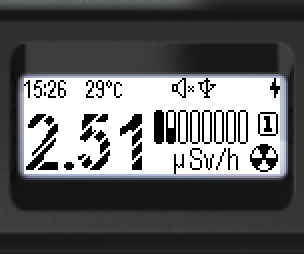
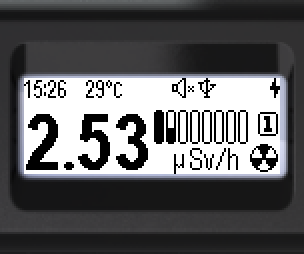
- Bei nicht zuverlässigen Werten sind die Ziffern mit feinen Diagonalstreifen schraffiert.
- Bei zuverlässigen Werten sind die Ziffern voll ausgefüllt.
Zwei Betriebsbereiche:
Impulsmodus (1): 0,1 µSv/h bis 1 mSv/h. Die Daten kommen vom Szintillator durch Registrierung einzelner Lichtblitze – so lassen sich niedrige Strahlungsniveaus schätzen und Quellen suchen. Die Energiekompensation erfolgt über eine werkseitig programmierte Kalibrierfunktion. Klicks und Zählrate sind verfügbar: Das Gerät gibt bei jeder Photonenregistrierung einen Klick aus und zeigt cps-Werte an.
Strommodus (2): 1 mSv/h bis 9 Sv/h. Die Dosisleistung wird in Echtzeit über den integralen Lichtstrom des Szintillators geschätzt. Klicks und Zählrate bleiben verfügbar, der Klickton ist in diesem Modus jedoch anders. Erforderlich für starke Strahlungsfelder.
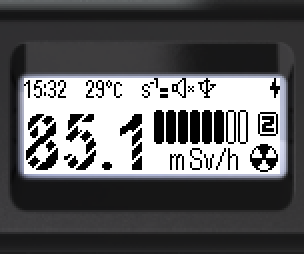
Bildschirm im Modus „Monitor“:
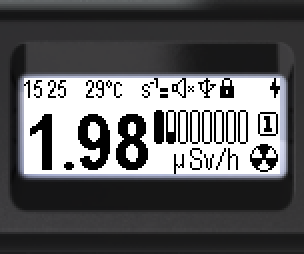
Statusleiste (oben, von links nach rechts):

- Aktuelle Uhrzeit: Stunden, Minuten
- Temperatur des Strahlungssensors
- Alarmsymbol für Dosisleistung, Dosis, Zählrate oder Temperatur
- Tonstatus
- Bluetooth- oder USB-Verbindung
- Tastensperre-Symbol
- Akkustatus
Unten: Schätzwert von Dosisleistung oder Zählrate, logarithmische Balkenanzeige, Bereichsnummer ( /
/ ), Einheit (Sv/h, rem/h oder cps, cpm), Symbol des aktuellen Anzeigemodus (
 Monitor).
Einheiten im Menü wählbar: Sv/h oder rem/h für die Dosisleistung; cps oder cpm für die Zählrate.
Die angezeigte Größe (Dosisleistung oder Zählrate) wird im Menü gewählt oder direkt mit den Tasten umgeschaltet.
Tastenfunktionen:
- Kurz ▲ – Dosisleistung ↔ Zählrate umschalten (nur im Impulsmodus)
- Lang ▲ – Ton ein/aus
- Kurz ▼ – Klicks ein/aus (nur im Impulsmodus und nur bei eingeschaltetem Ton)
Bei Überschreiten von Alarmschwellen – blinkende Symbole:
Dosisleistung:
„Alarm 1“ –  ; „Alarm 2“ –
  ; „Out of scale“ –
Zählrate:
„Alarm 1“ –  ; „Alarm 2“ –
  ; „Out of scale“ –
Aktualisiert: 21. Okt. 2026