How alarms work
Alarm sources are divided into two groups:
- Main — the current count rate, the current dose rate, the accumulated dose
- Additional — the current radiation sensor temperature
The device constantly compares the current values of the measured quantities with the corresponding thresholds. Depending on the direction in which a threshold is crossed, either an Alarm Event or an Alarm Clear Event is generated. Any Alarm Event switches the device from the Normal State to the Alarm State. After Alarm Clear Events have cleared all alarms, the device returns to the Normal State.
Main alarms
All main alarm sources have three alarm thresholds.
If the current count rate, dose rate or dose value crosses any of the thresholds from below, an Alarm Event occurs: first threshold — Alarm 1; second threshold — Alarm 2; upper limit of the scale — Out of scale.
The first and second level thresholds are set in the settings for each source separately and can be changed at your discretion. The third threshold is the upper limit of the measured quantity's scale and cannot be changed via the menu.
For each main alarm source, one of four states is defined:
- Normal — value below the first threshold (no alarm)
- Alarm 1 — value above the first threshold but not above the second
- Alarm 2 — value above the second threshold but not above the third
- Out of scale — value above the third threshold, beyond the scale
Exceeding the upper count rate threshold makes the dose rate estimate no longer valid. In this case the upper dose rate threshold is also considered exceeded.
Additional alarms
The radiation sensor temperature is an additional alarm source with two thresholds — upper and lower.
If the temperature rises above the upper threshold or falls below the lower threshold, a temperature Alarm Event occurs.
The temperature thresholds correspond to the operating temperature limits given in the technical specifications. These values are fixed and cannot be changed via the menu.
For the temperature, one of three states is defined:
- Normal — value above the lower threshold and below the upper one (no alarm)
- Low temperature — value below the lower threshold
- High temperature — value above the upper threshold
Alarm Signals
Each Alarm Event has Alarm Signals: a sound signal and a vibration signal. They can be turned on and off in the settings independently — for each level of any source. Stop the signal with a short press on the round button; it sounds again at the next Alarm Event.
The Alarm State is indicated by:
- Red LED flashes
- Alarm icons in the display status bar
- Line of unacknowledged alarms
- Dialog box with alarm icons
| Icon | Description |
|---|---|
| Count Rate Alarm 1 |
| Count Rate Alarm 2 |
| Count Rate out of scale |
| Dose Rate Alarm 1 |
| Dose Rate Alarm 2 |
| Dose Rate out of scale |
| Dose Alarm 1 |
| Dose Alarm 2 |
| Dose out of scale |
| Low temperature alarm |
| High temperature alarm |


Light signals can be turned on/off in the settings.
Device behaviour on an Alarm Event
For Alarm Events whose sound and vibration signals are disabled in the settings, the current Alarm State is shown by the corresponding icons in the display status bar.
For Alarm Events whose sound and/or vibration signals are enabled, the alarm signalling turns on: the device vibrates and emits the alarm sound. A short press on the round button turns the signalling off. After an alarm signal, the device waits for the user to explicitly acknowledge it (turning the signalling off with a short press is not an acknowledgement). The alarm is acknowledged only with a long press on the round button. The display then shows the line of maximum recorded alarm levels, either in the status bar:
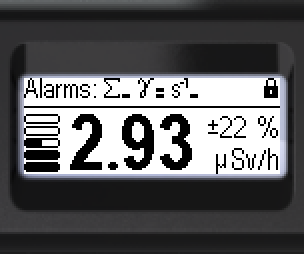
or as a dialog box:
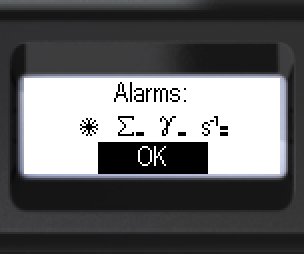
After the alarms are acknowledged, the previous screen is restored. The current active Alarm States of all sources are shown in the normal status bar by the corresponding icons, alternating.
When the level of an acknowledged alarm decreases, only its icon in the status bar changes.
When an acknowledged alarm returns to Normal, its icon disappears from the status bar. Note that an accumulated dose alarm ends only when the dose is reset or its threshold is changed.
Updated: Oct 26, 2026