Display
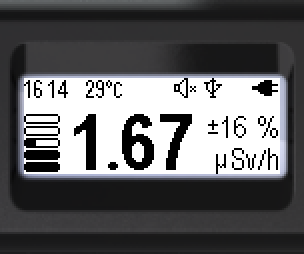
The device display is a monochrome graphic LCD, 128×48 pixels, 34×13 mm, FSTN, transflective, positive.
The display has a backlight for operation in the dark. In [Auto] mode the device assesses the ambient light itself: the backlight turns on only when a button is pressed and does not turn on in bright light (for example, in the sun). The backlight brightness has ten levels. The image orientation can be set for left- or right-hand use, or set to rotate automatically. Turning-on conditions, backlight duration, brightness and image orientation are set in the [Settings] menu.
The display shows: the device status, numerical and graphical display of the measured quantities, the control menu and the settings menu.
Measurement results are shown in several display modes: Spectrum mode (energy spectrum), Monitor mode (dose rate estimate), Dose mode (accumulated dose), Search mode (real-time data visualization). In these modes the status bar is at the top of the display; its content depends on the selected display mode. The icons used are described in detail in section “Icons and symbols”.
Handle the device with care: the display can be broken or scratched if handled carelessly.
Updated: Oct 26, 2026