Display modes
Search
The mode shows the count rate as a search graph — for an operational search for a source or an area with an elevated radiation level. On the screen: status bar at the top; the count rate search graph at the bottom.
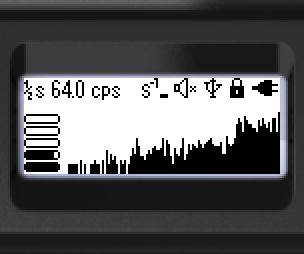
Status bar (top, left to right):

- Averaging time — one bar on the graph equals ½, 1, 2 or 4 seconds
- Current count rate value
- Count rate units — cps or cpm
- Threshold exceedance icon (dose rate, dose, count rate)
- Sound status
- Bluetooth or USB connection
- Lock icon
- Battery status
Bottom of the screen (left to right): graphical representation of the current count rate; the count rate search graph. The count rate units (cps or cpm) can be selected via the menu.
Hotkeys:
- Short ▲ — decrease the averaging time
- Short ▼ — increase the averaging time
- Long ▼ — clear the screen and start a new search session
- Long ▲ — sound indication on/off
Updated: Oct 26, 2026