Monitor
The mode shows the dose rate or count rate. When turned on, the device starts in this display mode. All incoming data is accumulated and analysed. If a change in the radiation environment is detected, the device starts a new data accumulation interval. If there are no signs of change, averaging continues and the confidence of the estimate increases. At sufficient radiation intensity, the random error in Monitor mode is kept at about 15% for the 2δ confidence interval.
Displayed values are considered valid if:
- their random error does not exceed 30% for the dose rate and 50% for the count rate
- the device sensor temperature is below +45 °C
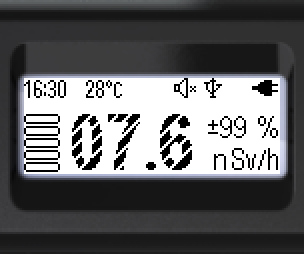
- Low-confidence values are shown with hatched digits.
- Valid values are shown with fully filled digits.
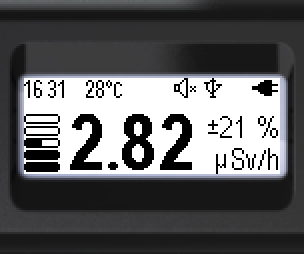
On the screen: status bar at the top; dose rate or count rate estimation parameters at the bottom.
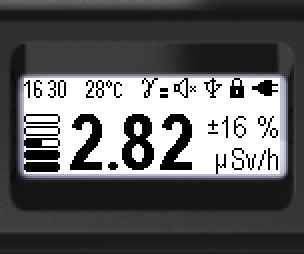
Status bar (top, left to right):

- Current time: hours, minutes
- Radiation sensor temperature
- Threshold exceedance icon (dose rate, dose, count rate)
- Sound status
- Bluetooth or USB connection
- Lock icon
- Battery status
Bottom of the screen (left to right): the dose rate or count rate estimate; the error in %; graphical representation of the dose rate or count rate estimate; dose rate units — Sv/h, rem/h — or count rate units — cps, cpm.
The units can be selected via the menu: Sv/h or rem/h when displaying dose rate; cps or cpm when displaying count rate.
The type of estimate (dose rate or count rate) can be selected in the menu or switched with the device buttons.
Hotkeys:
- Short ▲ — switch between the types of photon radiation intensity display: dose rate or count rate
- Long ▲ — sound indication on/off
- Short ▼ — turn clicks for registered photons on/off. Works only when the overall sound is on
Two alarm thresholds for the dose rate level and two for the count rate level can be set via the menu. When a threshold is exceeded, a flashing icon appears in the status bar.
For dose rate:
“Alarm 1” —  ; “Alarm 2” —
  ; “Out of scale” —
For count rate:
“Alarm 1” —  ; “Alarm 2” —
  ; “Out of scale” —
Updated: Oct 26, 2026