Display modes
Dose
The mode shows the accumulated dose. On the screen: status bar at the top; accumulated dose estimation parameters.
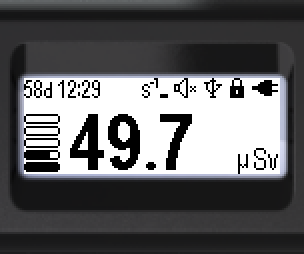
Status bar (top, left to right):

- Time since the start of dose accumulation: days, hours, minutes
- Threshold exceedance icon (dose rate, dose, count rate)
- Sound status
- Bluetooth or USB connection
- Lock icon
- Battery status
Bottom of the screen (left to right): the accumulated dose estimate; the logarithmic indicator; dose units — Sv, rem.
The units can be selected via the menu: Sv or rem.
Hotkeys:
- Long ▼ — reset the accumulated dose to zero
- Long ▲ — sound indication on/off
Two alarm thresholds for the accumulated dose level can be set via the menu. When a threshold is exceeded, a flashing icon appears in the status bar:
“Alarm 1” —  ; “Alarm 2” —
  ; “Out of scale” —
Updated: Oct 26, 2026