Display modes
Spectrum
The mode shows the general view of the photon radiation (gamma and X-ray) energy spectrum. On the screen: status bar at the top; the energy spectrum.
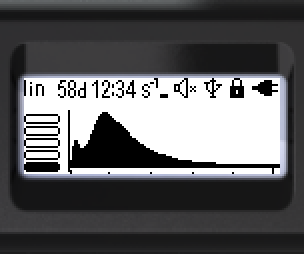
Status bar (top, left to right):

- Amplitude scale of the photon radiation energy spectrum — linear or logarithmic
- Time since the start of spectrum accumulation: hours, minutes, seconds
- Threshold exceedance icon (dose rate, dose, count rate)
- Sound status
- Bluetooth or USB connection
- Lock icon
- Battery status
Bottom of the screen (left to right): graphical representation of the dose rate estimate; histogram of the energy spectrum.
Marks under the energy scale of the histogram:
- Dots — every 100 keV
- Dashes — every 500 keV
- Arrows — every 1000 keV
Hotkeys:
- Short ▲ — switch the spectrum amplitude scale between linear and logarithmic
- Short ▼ — cycle the energy scale range: 1 MeV → 2 MeV → 3 MeV → 1 MeV …
- Long ▼ — clear the screen and start a new spectrum accumulation session
- Long ▲ — sound indication on/off
Updated: Oct 26, 2026