Icons and symbols
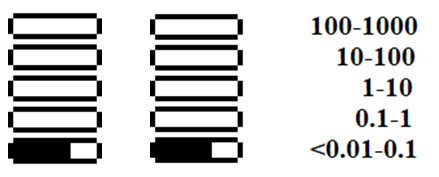
Logarithmic indicator
In all display modes except settings, the display shows a logarithmic indicator. Each horizontal bar shows a value (dose rate, dose, count rate) on a logarithmic scale. The values shown in adjacent bars differ by a factor of 10. For example, for the dose rate (µSv/h) the ranges are as follows:
Status bar icons
Icons label the fields on the status bar. The battery level icons differ between the series.
Battery level — Radiacode-10X series:
| Icon | Description |
|---|---|
| At least 60% charge |
| At least 30% charge |
| At least 10% charge |
| Less than 10% charge — charge the battery |
| The battery is charging |
| Charge completed, powered from an external source |


Battery level — Radiacode-1XX series:
| Icon | Description |
|---|---|
| 100 to 90% charge, running on battery |
| Less than 90% charge |
| Less than 80% charge |
| Less than 70% charge |
| Less than 60% charge |
| Less than 50% charge |
| Less than 40% charge |
| Less than 30% charge |
| Less than 20% charge |
| Less than 10% charge — charge the battery |
| The battery is charging |
| Charge completed, powered from an external source |


Note: on Radiacode-1XX series devices, the battery charge percentage is displayed next to the graphical charge level icon.
Common status bar icons (both series):
| Icon | Description |
|---|---|
| Swing buttons are locked |
| USB connection established |
| Bluetooth connection established |
| All sounds are off |
| Sounds are on |
| Count Rate Alarm 1 |
| Count Rate Alarm 2 |
| Count Rate out of scale |
| Dose Rate Alarm 1 |
| Dose Rate Alarm 2 |
| Dose Rate out of scale |
| Dose Alarm 1 |
| Dose Alarm 2 |
| Dose out of scale |
| Low temperature — lower temperature threshold crossed |
| High temperature — upper temperature threshold crossed |
| Linear amplitude scale of the photon radiation energy spectrum |
| Logarithmic amplitude scale of the photon radiation energy spectrum |


Menu item icons
In the menu (short press on the round button) the sections are marked with icons and text.
| Icon | Item | Description |
|---|---|---|
| Settings | Opens the device settings menu |
| Spectrum | Display of the photon radiation (gamma and X-ray) energy spectrum — display mode |
| Monitor | Display of the current dose rate or count rate — display mode |
| Dose | Display of the accumulated dose of photon radiation (gamma and X-ray) — display mode |
| Search | Search mode — display of the count rate as a graph |
| Power off | Turning off the device — action |
| Device info | Opens Device info — device serial number and software version |


Updated: Oct 26, 2026